



Have you ever wondered why some foods fill you with fewer bites while others leave you reaching for more before your meal ends? The secret often lies in their calorie density. Calculating and interpreting calorie density is vital to healthier eating and effective weight management. Calorie density calculators have made this once-complicated task much more manageable, helping you make informed choices about what you eat.
Understanding calorie density can help you eat more, weigh less, and choose the right portion sizes with confidence.
In this article, you’ll find out what a calorie density calculator is, how it works, and why it’s a game-changer for those looking to manage their weight without feeling deprived. We’ll cover everything from the inputs required for calculation and the formula behind it to actionable tips for interpreting your results.

What is calorie density?
Calorie density refers to the number of calories in a specific volume or weight of food. Foods with high-calorie density provide more calories in a smaller portion, while foods with low-calorie density offer fewer calories for the same volume. For instance, nuts are calorie-dense due to their high fat content. In contrast, fruits and vegetables are generally low in calorie density, making them ideal for those looking to lose weight or maintain a healthy diet.
Why is calorie density critical for weight management?
Calorie density is essential for effective weight management because it directly influences your daily caloric intake. By understanding the calorie density of foods, you can make informed choices that lead to a more satisfying diet without overconsuming calories. Lower-calorie-density foods, like fruits and vegetables, allow you to eat larger portions that keep you full and satisfied, all while consuming fewer calories. This approach can simplify weight management practices by helping you avoid high-calorie foods with little nutritional value. Ultimately, integrating the awareness of calorie density into your dietary habits can lead to healthier eating patterns and successful weight management over time.
How To Use a Calorie Density Calculator
A calorie density calculator is straightforward and requires specific inputs to generate accurate results. Here’s a step-by-step guide on how to utilize this fitness calculator effectively.
Inputs Required
- Food Type: Solid food, liquid (drink), soup (sauce)
- Serving Size: The amount of food you are consuming, usually measured in grams or ounces.
- Total Calories: The total number of calories in the specified serving size.
- Nutritional Information: This may include macronutrient breakdowns (carbohydrates, proteins, fats) and other relevant data, depending on the calculator used.
Many calorie density calculators include an option to select “whole grain” because whole grains tend to have a lower calorie density compared to processed grains. This option allows you to make informed comparisons between whole grains and refined grains, aiding in healthier food choices and better weight management strategies. Whole grains are rich in fiber and essential nutrients, contributing to satiety with fewer calories, which is crucial for those aiming to manage or reduce weight effectively.
Step-by-Step Process
- Select the Food Type: Select the food type from the calculator’s available options.
- Input Serving Size: Specify the serving size you plan to consume. This is crucial, as calorie density can vary significantly based on portion size.
- Enter Total Calories: Input the total calories for the specified serving size. Many nutritional labels provide this information.
- Calculate: Click the ‘Calculate’ button after entering the necessary data. The calculator will process the inputs and provide the calorie density value.
- Review the Results: The output will typically show the calorie density expressed as calories per gram or per ounce.
The formula for calculating calorie density
The formula for calculating calorie density is:
Calorie Density = Calories per Serving / Serving Size (in grams)
Using this simple equation, you can determine how many calories you consume per gram of the food you eat, making it easier to make informed dietary choices.
Foods with a low-calorie density can aid in weight loss by helping you feel fuller with larger portions, all while consuming fewer calories.
Tips For Interpreting Results & Applications
Interpreting the results from a calorie density calculator can provide insights into dietary choices and overall nutrition. Here are some tips for making sense of the data:
1. Compare Different Foods
Use the calculator to compare the calorie densities of various foods. This can help identify which foods are more calorie-dense and lighter, aiding in meal planning.
2. Portion Control
Recognize that high-calorie-density foods, while tasty, can contribute to overeating if portion sizes are not monitored. Use the data from the calculator to control portions of calorie-dense foods.
3. Include Low-Calorie-Density Foods
Incorporate more low-calorie-density foods, such as fruits and vegetables, into the diet. These foods provide bulk and nutrients without excessive calories, making achieving weight loss or maintenance goals easier.
4. Focus on Nutritional Quality
While calorie density is essential, it’s equally vital to consider the overall nutritional quality of foods. A food’s vitamin, mineral, and fiber content should also influence dietary decisions.
5. Monitor Changes Over Time
Regularly use the calorie density calculator to monitor changes in eating habits and their effects on weight management. Keeping track of calorie density can help individuals adjust their diets as needed.
The Relationship Between Calorie Density And Weight Management
Understanding the relationship between calorie density and weight management can be a game-changer in your health journey. Low-calorie-density foods allow you to consume larger portions without exceeding your calorie goals, keeping you satisfied. This is because these foods often have higher water content and lower fat, which helps fill you up with fewer calories.
On the other hand, foods with high-calorie density pack a lot of calories into smaller portions, often leading to overconsumption without even realizing it. Consider dense, processed snacks or fast food—they can be calorie traps. By focusing on the energy density of foods, you can better manage your overall caloric intake, thus supporting weight control or weight loss goals.
Moreover, opting for low-calorie-dense options is not only about reducing calorie intake. It can encourage the intake of nutrient-rich foods such as fruits, vegetables, and whole grains, promoting better health beyond just the numbers on the scale. In essence, embracing the principles of calorie density can simplify nourishing your body while satisfying hunger, which is key to sustainable weight management.
Calorie Density versus Nutrient Density
When considering food choices for a balanced diet, understanding the distinction between calorie density and nutrient density is crucial. While calorie density focuses on the amount of energy (calories) per unit of weight or volume, nutrient density emphasizes the concentration of essential nutrients like vitamins, minerals, and antioxidants per calorie. Essentially, nutrient-dense foods provide more nutritional benefits without excessive calorie intake.
Feeding your body nutrient-dense foods means prioritizing items like vegetables, fruits, lean proteins, and whole grains, which are packed with nutrients and generally have a lower calorie density. On the other hand, foods with high-calorie density, such as sweets and fatty snacks, might offer lots of calories with minimal nutrient content.
The goal is to find a healthy balance between the two: opt for foods that deliver essential nutrients and cater to your body’s energy needs, helping you maintain a healthy weight and meet dietary guidelines.
How accurate are calorie density calculators?
Calorie density calculators are generally accurate as long as you input up-to-date nutritional data. These tools are designed to guide you toward healthier eating by calculating the number of calories per unit weight of food. However, their accuracy dramatically depends on the precision of the data you provide. Using reliable sources or food labels is crucial to ensure the best results. Therefore, while they can be a valuable resource for monitoring your diet, they are not foolproof and should be part of a broader approach to healthy eating and weight management.
Low-calorie density foods
| Food Category | Examples |
|---|---|
| Non-starchy Vegetables | Broccoli, Spinach, Cucumber |
| Fresh Fruits | Apples, Oranges, Berries |
| Potatoes and Grains | Sweet Potatoes, Brown Rice |
| Legumes | Lentils, Black Beans, Chickpeas |
| Non-fat Dairy | Skim Milk, Non-fat Yogurt |
| Lean Proteins | Chicken Breast, Tofu, Fish |
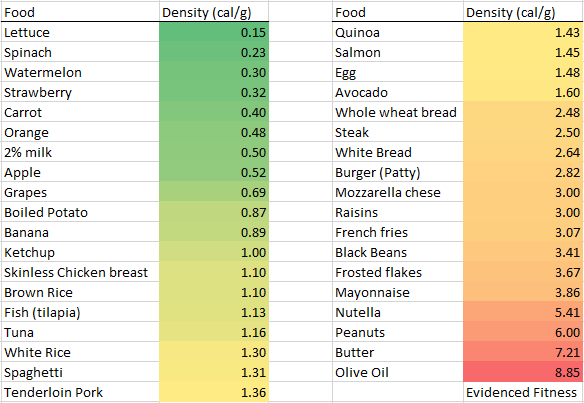
High-calorie density foods
| Food Category | Examples |
|---|---|
| Fats and Oils | Butter, Olive Oil, Coconut Oil |
| Nuts and Seeds | Almonds, Walnuts, Sunflower Seeds |
| Dried Fruits | Raisins, Dates, Dried Apricots |
| Processed Foods | Potato Chips, Cookies, Candy Bars |
| High-Fat Dairy | Cheese, Cream, Whole Milk |
| Fatty Meats | Sausage, Bacon, Ribeye Steak |
Conclusion
A calorie density calculator is a powerful tool for anyone interested in fitness, nutrition, and weight management. By understanding how to use this calculator effectively, individuals can gain valuable insights into their dietary choices. With the ability to calculate and interpret calorie density, users can make informed decisions that align with their fitness goals.
Exploring other dietary and nutrition calculators can offer additional insights into macronutrient distribution, caloric needs, and meal planning strategies for those looking to enhance their nutritional knowledge further.
